

Tick chart explained: what a 2000 tick chart shows vs time bars
A tick chart closes a bar after a fixed number of trades instead of a fixed number of minutes, so busy periods get many bars and quiet periods get few. A 2000 tick chart draws one bar every 2000 trades. It does not show more than a time chart; it slices the same trades differently, and that changes what every bar-based indicator and rule reads.
By Soren Huang · Published · updated · Editorial policy
Contents
- What is a tick chart?
- What does a 2000 tick chart show?
- Tick chart vs time chart: what are the pros and cons?
- NQ 2000 tick vs 5-minute: what changes on the same session?
- Why do tick charts work differently in futures than in forex?
- Can you backtest a tick-chart strategy, and what does the data need?
- Frequently asked questions
- References
What is a tick chart?
A tick chart closes each bar after a fixed number of trades instead of a fixed number of minutes. A 2000 tick chart draws one bar every 2000 trades, so busy minutes get many bars and quiet hours get few. Time bars keep the clock fixed and let the trade count vary. Neither shows more information; they slice the same trades differently.
A tick is one recorded trade on the exchange, at one price, for one or more contracts. A tick bar is a bar that opens on the first of a set number of trades and closes on the last one, with the usual open, high, low and close inside it. A time bar is a bar that opens at a fixed clock time and closes a fixed number of minutes later, whatever happened in between. The difference is like two bus services. The time bar is a bus that leaves every five minutes, full or empty. The tick bar is a shuttle that leaves only when 2000 seats are taken, which can be every few seconds at rush hour and once every several minutes at midday.
The claim this article rests on: a tick chart changes the ruler, not the market. The trades are the same. What changes is how many of them each bar holds, and that in turn changes what every indicator length, pattern rule and time-based exit means. So the bar type is a setting to test, not a belief to hold.
What does a 2000 tick chart show?
A 2000 tick chart compresses quiet periods into a few bars and stretches the open and news minutes into many bars, each holding about the same amount of trading activity. The number 2000 is the trade count per bar. It is a setting, not a standard, and traders choose it so that bars arrive at a pace that suits the rules they trade.
Because the trade count per bar is fixed, the time per bar is what varies. At the US cash open at 09:30 ET, when order flow is heaviest, a 2000 tick bar on an active index future can close in well under a minute. In the midday lull the same bar can take several minutes. The chart therefore looks "zoomed in" where the market is busy and "zoomed out" where it is quiet.
Hypothetical example
Suppose, on one example day, the 09:30 to 10:30 ET hour carries 300,000 trades and the 12:00 to 13:00 ET hour carries 30,000 trades. A 2000 tick chart prints 150 bars in the open hour, one bar roughly every 24 seconds, and 15 bars in the lunch hour, one bar roughly every 4 minutes. A 5-minute chart prints 12 bars in each hour, but the open-hour bars hold about 25,000 trades each and the lunch-hour bars about 2,500 each.
Two consequences follow. First, the meaning of "2000 ticks" drifts over the years. Hendershott, Jones and Menkveld (2011) document the rise of algorithmic trading in US equity markets, and one visible effect of more electronic order flow is more trade prints per minute, so a fixed tick count covers less clock time today than it did a decade ago. Second, in an extreme event the chart can print bars faster than anyone can read them: the regulators' report on the market events of May 6, 2010 describes very heavy trading in the E-mini S&P 500 within a few minutes, and a tick chart compresses such minutes into a long run of bars.
Tick chart vs time chart: what are the pros and cons?
Tick bars equalize activity per bar and remove the dead lunch-hour bars, while time bars keep a fixed clock that sessions, indicators and most historical data are built around. Neither is better in general. Each one helps some rules and costs others, and the table shows where.
| Aspect | Tick chart | Time chart |
|---|---|---|
| Activity per bar | Roughly constant; each bar holds the same trade count | Varies widely; the open bar and the lunch bar hold very different counts |
| Dead periods | Compressed into a few bars; no run of flat bars | Printed in full; indicators flatten and can fire on noise |
| Session alignment | A bar can straddle the cash open or the close | Bars line up with session boundaries by construction |
| Indicator meaning | A 20-bar length is a window of activity, not of time | A 20-bar length is a fixed number of minutes |
| Data availability | Needs trade-level history or bars built from it; less common | Widely available for many years back |
| Backtest reproducibility | Depends on the feed and how it counts trades | Same bars from any clean source with the same session settings |
The indicator row matters most for rule-based traders. The guide to technical analysis tools and indicators you can test explains that most indicators are defined over a number of bars, not a number of minutes. Move the same indicator from a 5-minute chart to a tick chart and its lookback silently changes from "the last 100 minutes" to "the last 20 bars of 2000 trades each, however long those trades took". Chart patterns inherit the same shift: the exact rules in the article on the double bottom chart pattern and how to test it count bars between the two lows, and on a tick chart that count measures activity, not time, so the same price shape may or may not qualify.
A practical way to decide: if your rule is about activity (breakouts on heavy order flow, exhaustion after a burst of trades), tick bars give it a steadier footing. If your rule is about the clock (first 30 minutes of the session, exit before the close, overnight hold), time bars keep the rule honest.
NQ 2000 tick vs 5-minute: what changes on the same session?
On NQ the same session produces many more tick bars around the cash open and far fewer at midday than the 5-minute chart, so an indicator with the same length reads a different window of market activity on each. NQ is the E-mini Nasdaq-100 future on CME. The US stock market's regular session opens at 09:30 ET and closes at 16:00 ET, and those two moments are when NQ order flow is heaviest; the free futures market hours tool shows the NQ session in your own time zone. Exchanges can change session times, so confirm them on the exchange's contract page before you build rules around them.
Take a 20-bar indicator, such as a 20-bar moving average. On the 5-minute chart it always covers 100 minutes. On the 2000 tick chart, using the hypothetical day from the earlier example, it covers about 8 minutes at the open and about 80 minutes at lunch. The indicator has the same name and the same setting on both charts, but it is measuring two different things.
What changes when you move an NQ rule from 5-minute bars to 2000 tick bars:
- Bar count per session. The time chart gives a fixed number of bars per session; the tick chart gives a number that changes every day with volume, and is largest on news days.
- Indicator window. Every lookback becomes an activity window. The article on the best indicator for intraday trading and what testing shows covers why an indicator that reads well on one bar size often reads differently on another; the tick chart is an extreme case of that.
- Session boundaries. A tick bar can start before 09:30 ET and close after it, mixing pre-open and cash trades. Rules that need the first bar of the cash session must handle this.
- Bar-count exits. "Exit after 6 bars" is 30 minutes on the 5-minute chart and a variable, often very short, time on the tick chart.
- Volume per bar. A tick bar fixes the number of trades, not the number of contracts. A bar of 2000 small trades and a bar of 2000 large trades look the same on a tick count but differ in volume.
Rules built on price levels rather than bars are the exception. A level from gamma exposure (GEX) and what its levels mean, a prior day's high or a round number sits at the same price on any chart. Only the rules that count bars or average over bars change their meaning when the bar type changes.
Why do tick charts work differently in futures than in forex?
Futures ticks are counted from one exchange's trade feed, while a forex tick is usually a quote update from one broker, so the same tick count means different things in the two markets and differs between forex brokers. This is the answer to "what is a tick chart in forex": it is a chart of quote changes, not of trades.
In futures, every NQ trade is matched on CME and reported in one feed. Two traders with the same data vendor and the same 2000 tick setting see the same bars. Small differences can still appear between vendors, because a single large order that fills against several resting orders may be reported as one print or as several, so even in futures the trade feed you backtest on should be the one you trade on.
In spot forex there is no central exchange. Each broker streams its own bid and ask, and a tick on most forex platforms is any change in that quote. Broker A may update its quote three times a second in a quiet market; broker B may update once a second. A 2000 tick chart on each shows a different number of bars for the same hour, and a rule tested on one broker's tick bars has not been tested on the other's.
| Futures (for example NQ) | Spot forex | |
|---|---|---|
| What one tick is | One trade reported by the exchange | One quote update from the broker |
| Source of the count | One central feed | Each broker's own feed |
| Same setting, same bars? | Yes, apart from minor vendor differences in how prints are grouped | No, bar counts differ by broker |
| Volume inside a bar | Real contracts traded | Usually quote count only, not traded size |
Can you backtest a tick-chart strategy, and what does the data need?
A rule can be tested on tick bars only when the bar data was built from the same trade feed and tick count as the chart you trade, and the bar type itself is a setting you should compare rather than assume. Most historical futures data is sold as time bars. Tick bars must either come from the same vendor already built at your count, or be built by you from trade-level history. Either way, check these points before you trust a single number:
- Same feed as live trading. Bars built from a different vendor's trade prints can close at different moments, which moves entries by a bar.
- Same tick count, including on old data. A 2000 tick bar from years ago covers far more clock time than one from last month, so the strategy's trade frequency drifts across the history. Read the per-year trade counts in the report and expect them to rise.
- Session handling stated. Decide whether a tick bar may straddle the cash open or the daily maintenance break, and apply the same choice in the backtest and on the live chart.
- Costs per trade, not per bar. Tick-bar strategies on the open often trade many times in a few minutes, so commission and slippage per round trip decide the result more than on a time chart.
- The same rule on time bars as a control. Run the identical rule on 5-minute bars over the same dates. If the result depends entirely on the bar type, you have learned something about the grouping, not about the market.
The control run is the reason to know what a complete report looks like before you start. The box below is one such report. It comes from an AlphaPrime (Valynox) run on NQ daily bars from 2019-01-02 to 2025-06-30, long and short with one contract, using an ADX rule as its only entry and exit, with no stop, target or filter. It is a stand-in rule built from a standard indicator, not a tick-chart strategy: daily bars were used because tick-bar history is the very thing this section says you must obtain for your own feed. The candidate shown is the one the search kept out of 1,024 it tried, chosen for its return against its drawdown. Picking the kept one after the fact flatters it; the ADX rule did not earn this money in any sense a reader can expect, and the figures are a backtest, not a forecast.
Source: AlphaPrime product engine (CPU), run 2026-10-31. NQ daily bars, 2019-01-02 to 2025-06-30, long and short, 1 contract, $20 commission and $10 slippage per trade.
| Number | Result |
|---|---|
| Net profit (closed trades) | $102,875 |
| Max drawdown | $80,685 |
| Trades | 43 |
| Win rate | 58.14% |
| Profit factor | 1.436 |
| Average trade | $2,392.44 |
| Time in market | 41.52% |
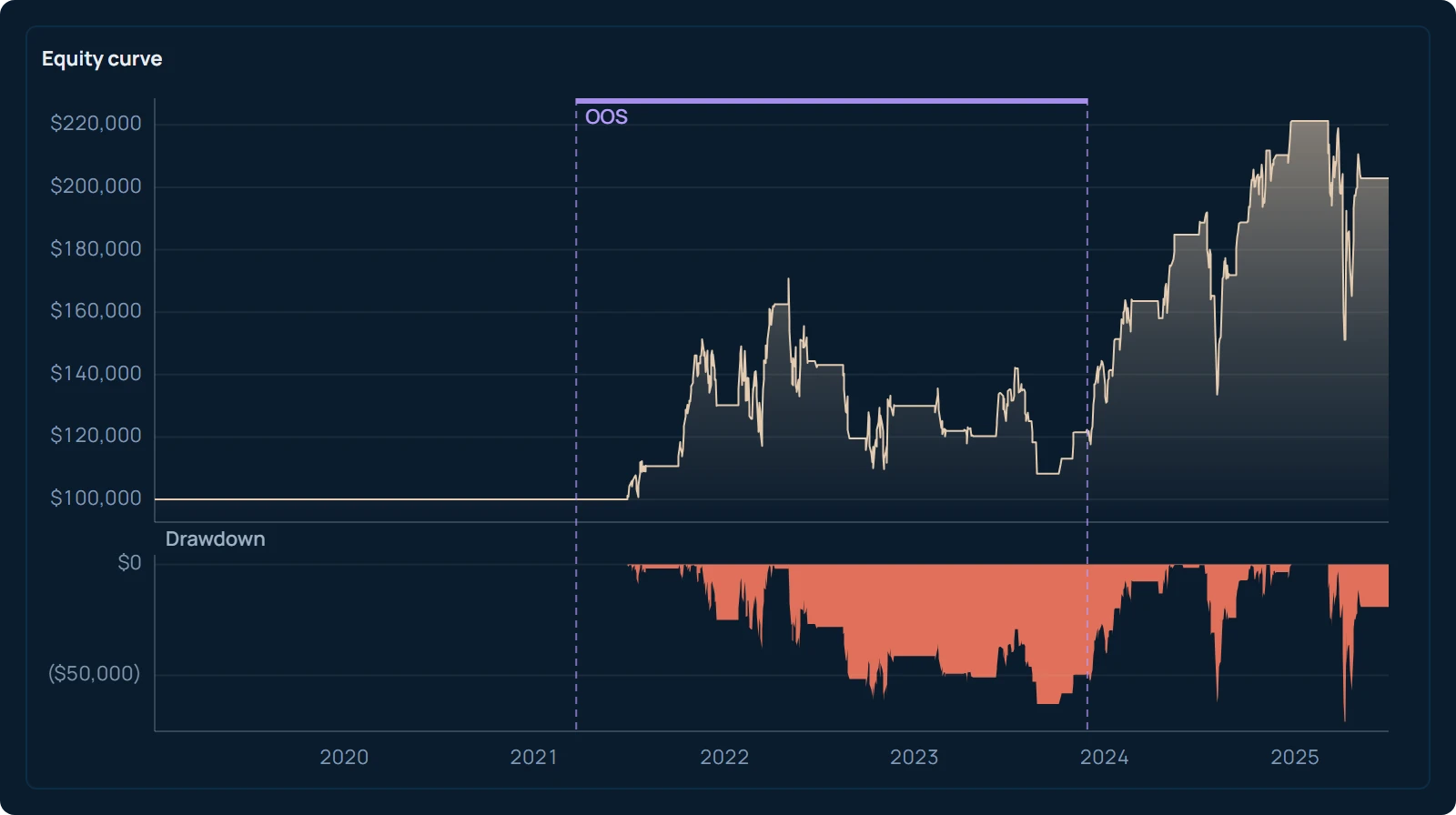
Read it the way you would read your own bar-type comparison. Forty-three trades over six and a half years is a small sample, so the average trade of $2,392.44 can move a lot if a few trades change. The max drawdown of $80,685 is large relative to the net profit of $102,875 because NQ is worth $20 per index point, so one contract on daily bars swings widely between exits. Bailey, Borwein, López de Prado and Zhu (2014) show why the best of many tried candidates carries an inflated result, and that applies to the kept candidate here exactly as it would to the best tick count you find by trying many. When you run the comparison, AlphaPrime charges the commission and slippage you set and fills on the next bar inside every evaluation in backtesting, so the tick-bar run and the time-bar run differ only in the bars, not in the cost model.
Next step: take one intraday rule you already use, write down what each of its bar-based numbers (lookback, bar-count exit, pattern width) means in minutes on your time chart, then run it on a 2000 tick chart from the same feed and count how many trades per year it produces in the first year of your history and in the last. If that count has more than doubled, the setting has drifted, and the tick count, not the rule, is what you are testing.
Frequently asked questions
What is a tick chart in forex?
In spot forex a tick is usually a change in the broker's bid or ask quote, not a completed trade, because there is no central exchange reporting trades. A 2000 tick chart on a forex platform therefore closes a bar every 2000 quote updates from that one broker. Two brokers quote at different rates, so the same setting gives different bars and a rule tested on one broker's tick chart has not been tested on another's.
Does a tick chart show volume?
A tick bar fixes the number of trades, not the number of contracts. A bar of 2000 single-contract trades and a bar of 2000 ten-contract trades look the same on the tick count but hold very different volume. Most platforms still show the traded volume under each tick bar, and it varies from bar to bar just as it does on a time chart.
Is a tick chart better than a time chart for day trading?
Neither is better in general. Tick bars give each bar the same amount of activity, which helps rules about order flow and breakouts and removes long runs of flat lunch-hour bars. Time bars keep a fixed clock, which helps rules about the session open, the close and time-based exits, and they are easier to backtest because historical time bars are widely available. Test the same rule on both before you decide.
How many ticks should I use for an NQ chart?
There is no standard count. Choose a tick count that makes bars arrive at a pace that fits the rule you trade, then check how that pace changes between the open, midday and the close, and between the first and last year of your history. Because trade counts per minute rise over time, a count that fits today covers more clock time on older data, so compare the trades per year across the whole backtest.
References
- CME Group. E-mini Nasdaq-100 Futures contract specifications (contract size $20 × index, minimum tick 0.25 index points = $5.00). cmegroup.com/markets/equities/nasdaq/e-mini-nasdaq-100.contractSpecs.html
- Staffs of the CFTC and SEC (2010). Findings Regarding the Market Events of May 6, 2010. Report to the Joint Advisory Committee on Emerging Regulatory Issues, September 30, 2010.
- Hendershott, T., Jones, C. M., & Menkveld, A. J. (2011). Does Algorithmic Trading Improve Liquidity? The Journal of Finance, 66(1), 1–33.
- Bailey, D. H., Borwein, J., López de Prado, M., & Zhu, Q. J. (2014). Pseudo-Mathematics and Financial Charlatanism: The Effects of Backtest Overfitting on Out-of-Sample Performance. Notices of the American Mathematical Society, 61(5), 458–471.