Keep your platform.
Export to MultiCharts, bar for bar, or to five others.
No need to change how you chart and trade. AlphaPrime exports strategies as source code for your trading platform — plain text you can read and edit. These are the platforms supported today.
MultiCharts
Exports PowerLanguage source code.
TradingView
Exports Pine Script v6 source code.
TradeStation
Exports EasyLanguage source code.
NinjaTrader 8
Exports NinjaScript source code.
MetaTrader 4
Exports MQL4 source code.
MetaTrader 5
Exports MQL5 source code.
How it works
Each strategy is one plain-text source file. For MultiCharts and NinjaTrader, shared functions live in the AlphaPrime function library, which you import once; TradingView and TradeStation strategies need no library.
Rollover
Choose a roll method for each futures instrument: by date rule, by open interest, by volume or custom dates. Exports to all six platforms write the same roll rule into the source code.
You can read the logic of every exported strategy and edit it yourself. New platforms will be listed on this page as they are added.
Export to MultiCharts: bar-for-bar consistency
Since 2017, the most common and most costly problem with software-generated strategies has been inconsistency between the backtest results of the generator and those of MultiCharts: the same rules, yet different trades. This is one of the main reasons AlphaPrime was developed.
For this reason, the MultiCharts export is verified bar by bar. Load the same data and set the same session and costs, and the exported PowerLanguage strategy triggers on the same bars as in the AlphaPrime backtest, with identical entries and exits.
The header of every exported file states the backtest settings: instrument, bar period and date range, capital and contracts, commission and slippage per side, big point value, minimum tick, MaxBarsBack, time zone and session, and Bar Magnifier off. The backtest results are appended at the end of the file for comparison.
When trade lists do not match, the cause is almost always a difference in settings. A one-bar offset indicates a different time zone or session; different fill prices usually indicate missing commission or slippage. If both are correct, compare the data sources: different data vendors may produce slightly different bars from the same market.
Before relying on the results, compare one week of trades side by side.
Five other platforms
For TradingView, the export is Pine Script v6; for TradeStation, EasyLanguage; for NinjaTrader 8, NinjaScript; for MetaTrader 4, MQL4; and for MetaTrader 5, MQL5. Every file uses the same rules and the futures roll method selected in AlphaPrime. Before live trading on any platform, follow the same approach as with MultiCharts: compare that platform's trade list with AlphaPrime's side by side on the same data.
Contents of the export
- One plain-text source file per strategy, which can be read, modified and placed under version control.
- For MultiCharts, the strategy can also be saved as .pla, combining the strategy and the functions it uses into a single file.
- MultiCharts and NinjaScript strategies call a shared AlphaPrime function library, which needs to be exported and imported only once; Pine Script and EasyLanguage require no library.
- The trial version can also view and export source code, so the full export process can be verified before payment.
Once the source code is modified, the user is responsible for any differences from the original strategy. After modification, compare the trade list again, because the strategy is no longer the version AlphaPrime tested.
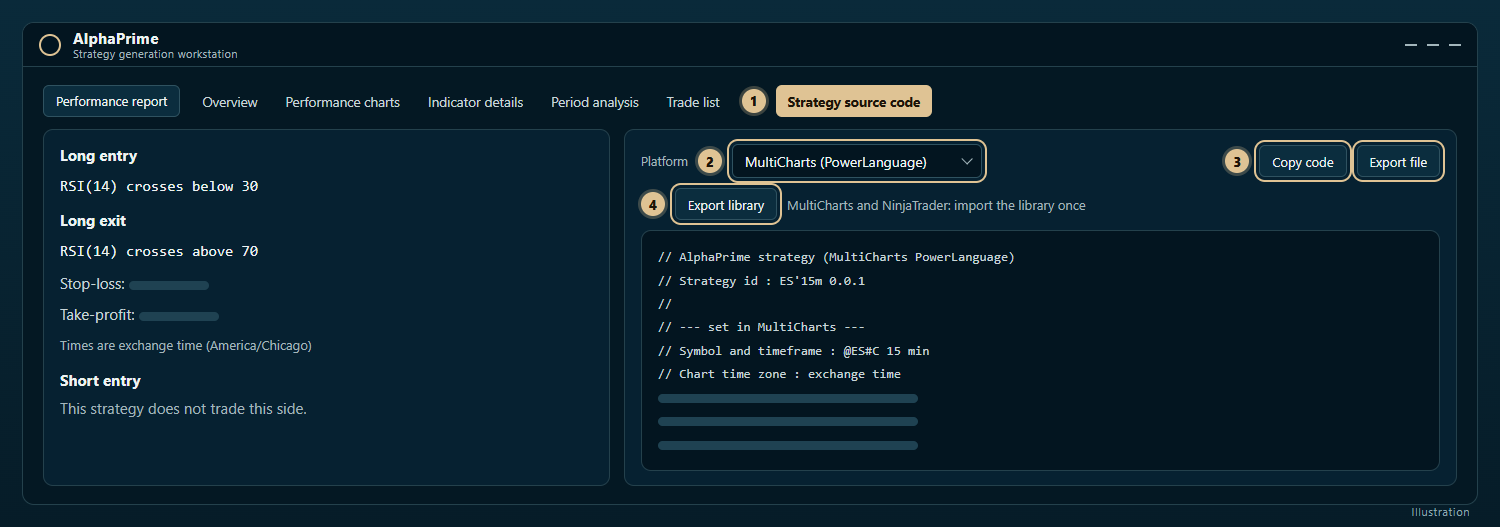
For complete steps and every setting, see Tutorial: exporting a strategy to MultiCharts PowerLanguage.
Export one strategy in the free 7-day trial and compare one week of its trade list with MultiCharts side by side.
One strategy,
source code for six platforms.
 AlphaPrime (Valynox)Exports to
- 01
 PowerLanguage
- 02
 Pine Script v6
- 03
 EasyLanguage
- 04
 NinjaScript
- 05MetaTrader 4MQL4
- 06MetaTrader 5MQL5
AlphaPrime exports to compatible platforms including MultiCharts, TradingView, TradeStation, NinjaTrader, MetaTrader 4 and MetaTrader 5. Platform names and logos are trademarks of their respective owners.