

Futures trading software: the 6 things systematic traders need
Futures trading software does three separate jobs: charting, backtesting and execution. Choose the backtesting part first, then check rollover and session control, source-code export, the broker link, total cost including learning time, and run one strategy on your own data before you pay.
By Soren Huang · Published · updated · Editorial policy
Contents
- What futures trading software do systematic traders need?
- Charting, backtesting or execution: which job comes first?
- Does the software handle contract rollover and session data?
- Can it automate a strategy and export it to other platforms?
- Which broker connectivity do you need?
- How much does futures trading software cost, and is free enough?
- Desktop or browser platform for futures: which fits your rule?
- The six-point checklist before you choose
- Frequently asked questions
- References
What futures trading software do systematic traders need?
Futures trading software for systematic traders needs six things: a backtest that charges commission and slippage with next-bar fills, correct contract rollover and session control, export of the rules as source code, a working broker link, a price you can justify after learning time, and a trial on your own data. Choose the backtesting part first.
The reason is that futures trading software does three different jobs. Charting software shows you price bars and lets you draw on them. Backtesting software replays a rule on old bars and reports what it would have earned after costs. Execution software sends orders to a broker and manages the open position. Almost no single program does all three well, and most traders end up with two or three programs that pass data and orders between them.
A systematic trader should settle the backtesting part first because every later choice depends on its output. The backtest report tells you which market, which session and which trade frequency survived costs. Until you have that report, you cannot know what data feed or broker you actually need. If you are still learning how contracts, margin and expiry work, read futures trading basics for systematic traders first; for an overview of what a tested rule can look like, see the five types in futures algo trading strategies.
Charting, backtesting or execution: which job comes first?
Backtesting comes first, because a chart shows an idea, a backtest shows whether the idea held up after costs, and execution only matters once something has held up. A chart that looks tradeable and a rule that made money net of commission are two different things, and only the second one is worth paying a broker for.
A backtest is a replay of a fixed rule on historical bars that records every trade the rule would have taken. For the report to mean anything, three settings must be present. Commission is the fee per contract on entry and exit. Slippage is the difference between the price the rule saw and the price a real order would have filled at; a stop order becomes a market order when it is triggered, so it often fills a tick or more away from the trigger. Next-bar execution is the rule that a signal read at the close of one bar is filled at the open of the next bar, never at the close it was read from. The full reasoning is in trading costs in backtests: commission, slippage and the average trade.
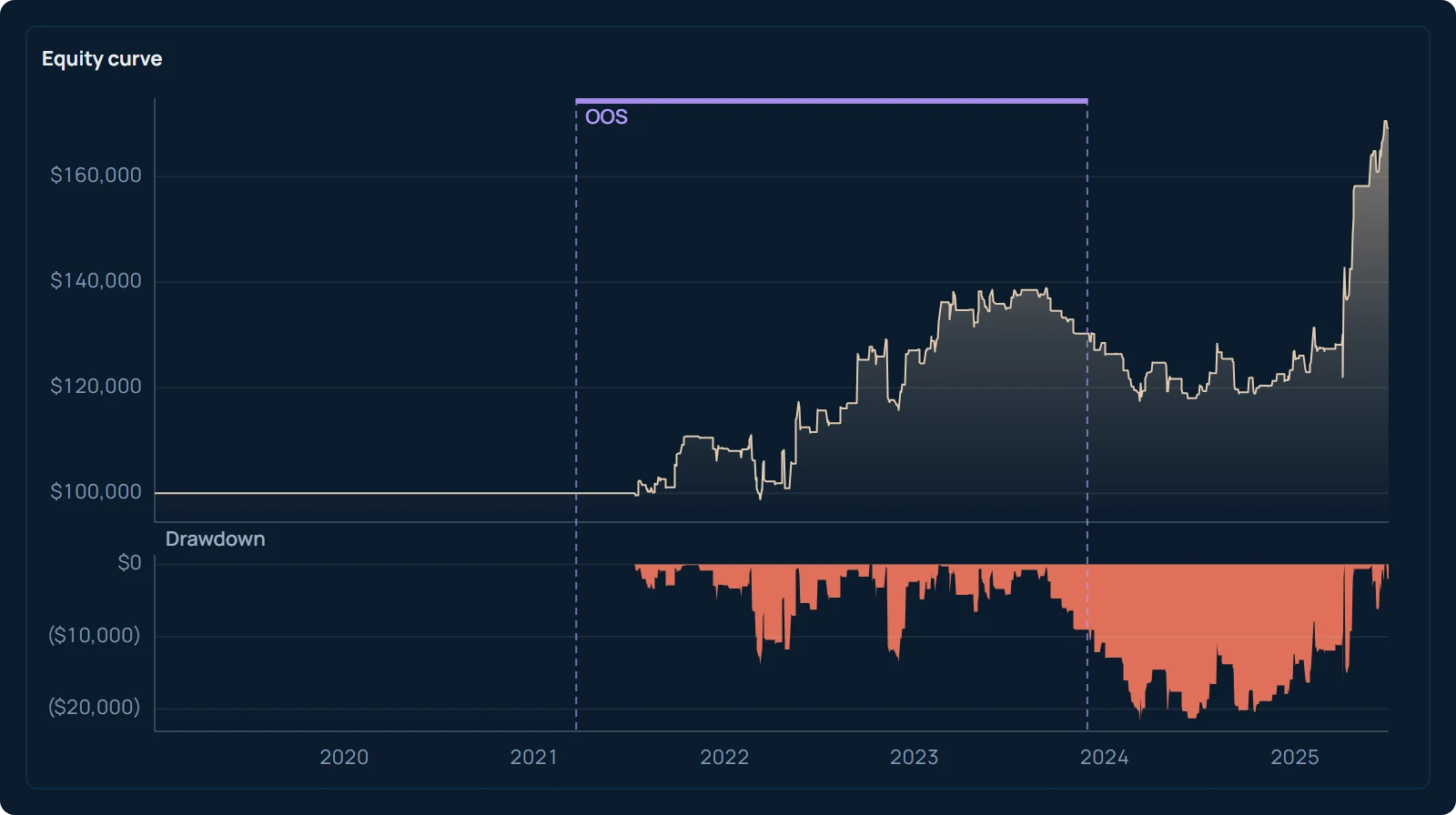
The box below shows the kind of output you are looking for. AlphaPrime (Valynox) ran a search on E-mini S&P 500 (ES) daily bars from 2019-01-02 to 2025-06-30, long and short, one contract, with $20 commission and $25 slippage charged on every trade. The search tried 1,024 candidates and kept one for its return against its drawdown. The kept candidate uses a MACD rule as its only entry and exit, with no stop, target or filter; it is a stand-in rule built from a standard indicator, not a test of any software. Picking the one kept candidate out of 1,024 after the fact flatters its numbers, so read the table as an example of a report layout, not as a result you can expect or a forecast.
Source: AlphaPrime product engine (CPU), run 2026-10-31. ES daily bars, 2019-01-02 to 2025-06-30, long and short, 1 contract, $20 commission and $25 slippage per trade.
| Number | Result |
|---|---|
| Net profit (closed trades) | $69,220 |
| Max drawdown | $22,175 |
| Trades | 169 |
| Win rate | 50.89% |
| Profit factor | 1.46 |
| Average trade | $409.59 |
| Time in market | 16.23% |
What makes this table usable is not the net profit line. It is that the trade count (169), the drawdown ($22,175) and the average trade ($409.59) are all shown next to the cost settings. With $45 charged per trade, you can see at once how much of the average trade is left after costs. A charting program with a "strategy tester" that shows only a profit figure, with no cost settings and no drawdown, does not let you make that check. Bailey, Borwein, López de Prado and Zhu (2014) show why the best result from a large search is almost always inflated; a report that hides the trade count hides the size of that problem.
Does the software handle contract rollover and session data?
A futures program must build continuous contracts without fake roll gaps and must let you set the exact session you plan to trade, or the backtest measures a market you will never trade. These two settings separate futures software from stock software, and a surprising number of programs get one of them wrong.
Rollover is the move from an expiring contract month to the next one. A continuous contract is a series that joins many contract months into one price history so a rule can be tested over years. The two months trade at different prices on the same day, so joining them without adjustment creates a jump at the roll date. A back-adjusted series shifts the older months by the price difference so the jump disappears.
Hypothetical example
Suppose the expiring contract closes at 5,000 index points on the roll date and the next contract closes at 5,020 the same day. A raw join shows a 20-point gap overnight. A trend rule reads it as a breakout and a mean-reversion rule reads it as an overshoot, yet nobody could have traded that move. A back-adjusted series adds 20 points to every older bar, and the gap is gone.
Check that the program lets you choose the roll rule (by date, by volume or by open interest) and the adjustment method. Then check the session setting. Most index futures trade through the night as well as the day, and a rule tested on full-session bars behaves differently from the same rule on day-only bars: the bar count, the volatility per bar and the overnight gaps all change. The program must let you define a day session, a night session or the full session and build bars from that definition. How the NQ night hours fall in Taiwan time, and what that does to a backtest, is worked through in the Nasdaq overnight session in Taiwan time; the free futures market hours tool shows each exchange's sessions in your own time zone. Exchanges change hours and contract terms from time to time, so confirm them on the exchange's contract page before a live test. The checklist in futures backtesting done right: specs, rollover, tick value and costs covers the remaining settings.
Can it automate a strategy and export it to other platforms?
Automation and export are two different features, and you should check them separately. Automation is the program running your rules live and sending orders as signals appear. Export is getting the rules out as source code that another platform can read. A program can automate without exporting, which locks your work inside it, or export without automating, which leaves order placement to another tool.
Export matters even if you never write code. A strategy that exists only as settings inside one program disappears when you change programs, change brokers or stop paying. A strategy that exists as readable source code can be opened, checked and run anywhere its language runs. This is also where a research tool and a trading platform meet: the research tool finds and tests the rule, the platform trades it. AlphaPrime exports a tested strategy as source code for MultiCharts (PowerLanguage), TradingView (Pine Script v6), TradeStation (EasyLanguage), NinjaTrader (NinjaScript), MetaTrader 4 (MQL4) and MetaTrader 5 (MQL5), so the rule you read in the report above is the rule your platform runs; the current list is kept on the supported platforms for export page.
If you do write code, the choice widens to libraries and scripts, with their own data and broker plumbing to build. What that path requires, and where it gets hard, is laid out in algo trading with Python: what you need and where it gets hard. Either way, ask two questions of any program: can it run my rule live against a broker, and can I take my rule out as text?
Which broker connectivity do you need?
You need to know which of three links each program supplies, because data feed, trading platform and broker form one chain, and an automated futures order travels along all three. A program that supplies two links still leaves you to arrange and pay for the third.
- Platform and data from one vendor, broker separate. You buy the charts and the feed together and connect a futures broker through the platform's broker list. Check that your broker is on that list before you subscribe.
- Broker supplies data and platform. Convenient and often free with an account, but the strategy usually cannot leave, and changing broker means rebuilding everything.
- Separate data vendor, separate platform, broker connected by API. The most flexible chain and the most pieces to keep working. Each piece has its own fee and its own failure mode.
Two checks apply to every row. First, the backtest data and the live data should come from the same session definition, or the live rule will see bars the backtest never saw. Second, ask whether the broker link handles a futures-specific case: what happens to an open position and a working stop when the contract month rolls.
How much does futures trading software cost, and is free enough?
Free software is enough for charting and a first backtest; paid software earns its fee when you need exact sessions, rollover control, cost settings and automation; and in both cases the hours spent learning cost more than the subscription. Treat the price as the smaller of two bills.
| Need | Free software | Paid software |
|---|---|---|
| Charting | Yes | Yes |
| Basic backtest | Yes | Yes |
| Commission and slippage settings | Limited | Full |
| Session and rollover control | Limited | Full |
| Automation to a broker | Rare | Usual |
| Export of source code | Varies | Varies |
| Learning time | Hours to days | Days to weeks |
Hypothetical example
Suppose a platform costs $100 a month and takes 40 hours to learn well enough to set sessions, rollover and costs correctly. If your time is worth $50 an hour, the first year costs $1,200 in fees and $2,000 in learning. A free program that takes 10 hours to learn but cannot set slippage costs $500 in time and then costs you an unknown amount in a backtest you cannot trust.
The same arithmetic answers the question "which is the best platform to trade micro futures". A micro E-mini contract is one tenth the size of the standard E-mini, so commission and slippage are a larger share of each trade's result, and a program that cannot charge them in the backtest is least suitable exactly where the contract is smallest. Judge a program by whether its backtest can charge your real round-trip cost, not by its monthly price.
Desktop or browser platform for futures: which fits your rule?
A desktop futures platform (MultiCharts is one example) lets you define sessions and roll rules yourself and automates through broker plug-ins; a browser platform (TradingView is one example) supplies vendor continuous symbols, charting from any device and alert-based automation; and the right type depends on whether your rule needs your own session and roll definitions. Neither type replaces the other, and many futures traders use both.
| Fact | Desktop platform | Browser platform |
|---|---|---|
| Runs on | Your own Windows machine | Browser and mobile apps, on the vendor's servers |
| Strategy language | The platform's own language, compiled on your machine | The platform's own script language, run by the vendor |
| Data feed | Chosen and paid for by the user | Supplied by the vendor |
| Sessions and rolls | Defined by the user: session templates, roll rule, adjustment method | Vendor continuous symbols |
| Automation | Broker plug-ins inside the platform | Alerts and connected brokers |
Apply the earlier sections to the table. If your rule depends on a day-only session or on a specific roll rule, you need the column where you define those yourself. If your rule works on continuous full-session bars and you want to view futures charts from any device and share scripts, the browser column fits. A tested rule exported as source code in either platform's language lets you run the same logic on either side, which is why the export check comes before the platform choice.
The six-point checklist before you choose
Check the six points in this order, so the cheap checks come first and the costly ones last, and move to the next point only after a pass.
- Backtest costs and next-bar fills. Can you enter your commission and slippage per contract, and does a signal at the close fill at the next bar? If not, stop here.
- Rollover and session control. Can you see the roll dates, choose the adjustment, and build bars from your own session definition?
- Source-code export. Can the rule leave the program as readable text?
- Broker connection. Is your futures broker on the list, and what happens to an open position at roll?
- Total cost including learning hours. Add the subscription and your hours for one year.
- One strategy on your own data. Load your own bars, run one rule you already know, and confirm the trade list matches what you expect before you pay.
Start today with point one: open the backtest settings of the program you already use, find the commission and slippage fields and the fill setting, and write down what they are set to. If any of the three is missing, you have your first finding before spending anything.
Frequently asked questions
What is futures trading software?
Futures trading software is any program used to view, test or trade futures contracts. It covers three jobs: charting (showing price bars), backtesting (replaying a rule on old bars with costs) and execution (sending orders to a broker). Most programs do one job well, so systematic traders usually combine two or three.
How much does futures trading software cost?
Prices range from free charting with a basic strategy tester to monthly or one-time fees for desktop platforms with full session, rollover and cost settings. The larger cost is usually the time needed to learn the program well enough to trust its backtests. Add your learning hours to the subscription when you compare options.
Is free futures software enough?
Free software is enough for charting, for learning how a rule behaves and for a first rough backtest. It is usually not enough when you need to charge your real commission and slippage, define a day or night session, or control how contract months are joined. Those are the settings that decide whether a backtest measures the market you will trade.
Should I use a desktop or a browser platform for futures?
A desktop platform runs on your own Windows machine with a data feed you choose, session templates, user-set rollover and strategies that can be automated through broker plug-ins. A browser platform runs on the vendor's servers with vendor continuous symbols, its own script language and alert-based or connected-broker automation. Choose by whether your rule needs your own session and roll definitions or works on continuous full-session bars.
References
- Bailey, D. H., Borwein, J., López de Prado, M., & Zhu, Q. J. (2014). Pseudo-Mathematics and Financial Charlatanism: The Effects of Backtest Overfitting on Out-of-Sample Performance. Notices of the American Mathematical Society, 61(5), 458–471.
- CME Group. FAQ: Micro E-mini Equity Index Futures. https://www.cmegroup.com/articles/faqs/frequently-asked-questions-micro-e-mini-equity-index-futures.html
- U.S. Securities and Exchange Commission. Stop, Stop-Limit, and Trailing Stop Orders (Investor Bulletin). https://www.investor.gov/introduction-investing/general-resources/news-alerts/alerts-bulletins/investor-bulletins-15