

What Is Touchance? Features, Fees, Supported Brokers, and Whether It Can Run a Strategy
Touchance is a multi-broker charting and order-entry program widely used by Taiwan futures traders. It handles quotes, conditional orders and API order submission, sending your orders to your broker account. Strategies are designed, backtested and validated elsewhere, then their signals are routed to it for execution. Fees, supported brokers and order types depend on your own broker.
By Soren Huang · Published · updated · Editorial policy
Contents
- What is Touchance, and what does it do?
- Is Touchance free? What costs come with using it?
- Which brokers and order functions does Touchance support?
- How do Touchance and a strategy execution platform divide the work?
- Can Touchance run a strategy built elsewhere?
- Which type of systematic trader suits Touchance?
- Frequently asked questions
- References
What is Touchance, and what does it do?
Touchance is a charting and order-entry program that many Taiwan futures traders use. One interface can log into accounts at several futures brokers, and it offers real-time quotes, conditional orders and program API order submission. It handles sending orders to the broker. The strategy itself is designed, backtested and validated elsewhere, and its signals are passed in to be executed.
Think of it as the last mile of a trading workflow. In your research tool you decide when to buy and when to sell, and Touchance sends the order to the broker's server at that moment. Its four core functions are:
- Charting and quotes: real-time domestic and overseas futures quotes, price charts and the order book, for manual monitoring or for a program to read.
- Multiple broker accounts: one program logs into several futures brokers' accounts, so you switch accounts without switching software.
- Conditional orders: trigger orders, OCO, trailing stops and similar, which the software or the broker's server monitors before sending the order automatically.
- Program API: the API (application programming interface) is the interface that lets your own code read quotes from and send orders through the software directly. Programmatic traders use it to turn signals into orders.
None of these four is strategy backtesting. That is not a flaw, it is a division of labor: order-entry software concentrates on routing orders well, and strategy search and validation are handled by other tools. For which tools can do that without writing code, see Automated trading without coding: how the platforms divide the work.
Is Touchance free? What costs come with using it?
Fees depend on the futures broker you get the software through and on which modules you choose, so there is no single answer that applies to everyone. Some brokers provide it free as a client service; others charge separately for particular modules or quote sources. Rather than taking someone's word that it is "free," go through a checklist and confirm each item with your own broker.
- Software use fee: Does your broker provide it free? Are there minimum contract volumes or other account conditions?
- Real-time quote fees: Domestic futures quotes usually come with the account; are overseas futures or exchange depth quotes charged separately?
- API or programmatic order module fees: Does the API you need for program trading require a separate application or payment? Is there a usage period?
- Futures commissions and transaction tax: These two have nothing to do with the software, but you pay them on every filled order. Commissions are negotiated with your broker, and transaction tax is levied under the law, with the rate set by the competent authority's announcements.
- Historical data or backfill fees: Is backfilling K-bars after a disconnection, or downloading longer history, charged? This affects which data set you use in your backtesting tool.
Item 4 is the easiest to overlook, because it is not a "software fee." But for systematic traders, commissions and slippage are the numbers that decide whether a strategy survives, and they should be entered at the backtest stage. Trading costs in backtests: commissions, slippage and average trade explains how to put these two numbers into every backtest, rather than discovering after going live that the profit has been eaten away.
Which brokers and order functions does Touchance support?
Touchance can log into accounts at several domestic futures brokers from one interface. The list of supported brokers changes as partnerships change, so there is only one way to check: ask your own broker whether it offers Touchance, and which modules the version includes. The list changes, but the items you need to verify do not. The table below is that checklist.
For systematic traders, order types matter more than the number of brokers. A stop-loss has to fire automatically on a trigger order, not depend on someone watching the screen. A trigger order is an order that is sent by the software or the broker's server only when price touches the trigger price you set, and it can be sent as a market or limit order. An OCO (one-cancels-other) order places two orders at once; when one is filled or triggered, the other is cancelled automatically, which is commonly used to place a stop and a target together.
| Order type | Purpose | Trigger condition | Common use in a strategy |
|---|---|---|---|
| Market order | Fills immediately at the current available price | Filled on submission | Entry, emergency exit |
| Limit order | Fills only at the specified price or better | Price reaches the limit | Entry, profit target |
| Trigger order (stop-loss trigger) | Sends the order only when price touches the trigger | Trade price reaches the trigger price | Stop-loss (relies on the trigger order, not manual action) |
| OCO order | Two orders placed together; when one is live, the other is cancelled | Whichever side triggers first | Stop and profit target placed together |
| Trailing stop | The stop price moves automatically up or down with the profit direction | Price pulls back by the set distance | Exit for trend trades |
Hypothetical example
Buy one mini-TAIEX contract at 20,000 points, and right after entry place an OCO: a stop trigger at 19,900 and a limit profit target at 20,200. A mini-TAIEX futures point is worth NT$50 (per the TAIFEX contract specification), so the 100-point stop distance is NT$5,000 and the 200-point target distance is NT$10,000. Whichever side price reaches first, the software sends that order and cancels the other, with no one needing to be at the screen.
When you check your own broker's version, go through the five order types in the table one by one: whether each is available, whether it is monitored on the software side or the broker's server side, and whether it fails during a disconnection. Contract specifications (point value and minimum tick) can be adjusted by the exchange, so use the TAIFEX contract specification page as the reference. To look up any futures contract's tick size and point value quickly, the free futures contract calculator can help.
How do Touchance and a strategy execution platform divide the work?
The two are a division of labor, not substitutes. A strategy execution platform loads strategies, runs backtests and emits signals during the session, while Touchance mainly handles quotes and order routing. A strategy execution platform is software that can load a strategy's source code, judge entries and exits bar by bar in the session, and emit signals; the platforms that can load an exported strategy are listed in trading platforms that support export. Many Taiwan programmatic traders chain the two into one workflow: the strategy is judged on the execution platform, and the orders go through Touchance to the broker.
Each execution platform has its own strategy language for describing entry and exit conditions and parameters. PowerLanguage and EasyLanguage share a common origin but are not identical, and a strategy moved between them needs rewriting in several places. The differences between EasyLanguage and PowerLanguage are covered item by item. Touchance itself has no such strategy language; it receives signals and provides an API so that signals from an external program or platform become orders.
| Aspect | Touchance | Strategy execution platform |
|---|---|---|
| Main job | Quotes and order entry | Strategy development, backtesting and emitting signals |
| Strategy language | API programs (self-written) | Each platform's own language (such as PowerLanguage, EasyLanguage) |
| Backtesting | Focused on order entry | Full backtest reports |
| Order routing and broker connection | Multiple broker accounts | Connects through a broker or order-routing software |
| Common pairing | Receives signals, then sends orders | Generates signals |
What this division means for you: when choosing tools, first ask where the signal comes from. If you already have an executable strategy on some execution platform, Touchance adds the multi-broker and order-routing segment. If you do not yet have a strategy, build it first, then come back to deal with order routing.
Can Touchance run a strategy built elsewhere?
Yes, but the order matters: first put the strategy on an execution platform that can emit signals from bars, or write it as a program that calls the Touchance API, and then let Touchance send the orders. A strategy produced by a research tool goes through three steps before it reaches the order-entry stage: export the source code, load it on the platform, and check it against the backtest.
- Complete the search and validation in the research tool. This includes checks such as out-of-sample and step-forward analysis, to confirm the candidate is worth taking to live trading.
- Export as platform source code. Export into the target platform's strategy language, such as PowerLanguage or EasyLanguage, so the platform can load it.
- Load it on that platform and check the backtest. Rerun it on the same data with the same commission and slippage settings, then compare the trade count and each entry and exit point. Importing a strategy into MultiCharts and checking the backtest results lists the comparison steps using one of these platforms as the example. Check the backtest before going live.
- The platform emits signals. During the session, that platform judges entries and exits from the bars.
- Touchance sends the order to the broker. The signal is turned into an order through the connection module or the API.
Taking AlphaPrime (Valynox) as an example, it completes search and validation in step 1 and exports the strategy as platform source code in step 2; the supported platforms are listed in the strategy export platform overview. Steps 3 to 5 then return to the division of labor between the execution platform and Touchance. The backtest below shows what a candidate looks like before export. This run tested NQ (E-mini Nasdaq-100 futures) on daily bars, 2019-01-02 to 2025-06-30, long and short, 1 contract, with $20 commission and $10 slippage per trade. The rules used a single MACD condition for entry and exit, with no stop, no target and no filters. It is a stand-in rule built from a standard indicator, used to demonstrate the process; it does not test Touchance itself.
Source: AlphaPrime product engine (CPU), run dated 2026-10-31. NQ daily bars, 2019-01-02 to 2025-06-30, long and short, 1 contract, $20 commission and $10 slippage per trade.
| Number | Result |
|---|---|
| Net profit (closed trades) | $96,490 |
| Max drawdown | $41,205 |
| Trades | 146 |
| Win rate | 56.16% |
| Profit factor | 1.373 |
| Average trade | $660.89 |
| Time in market | 17.7% |
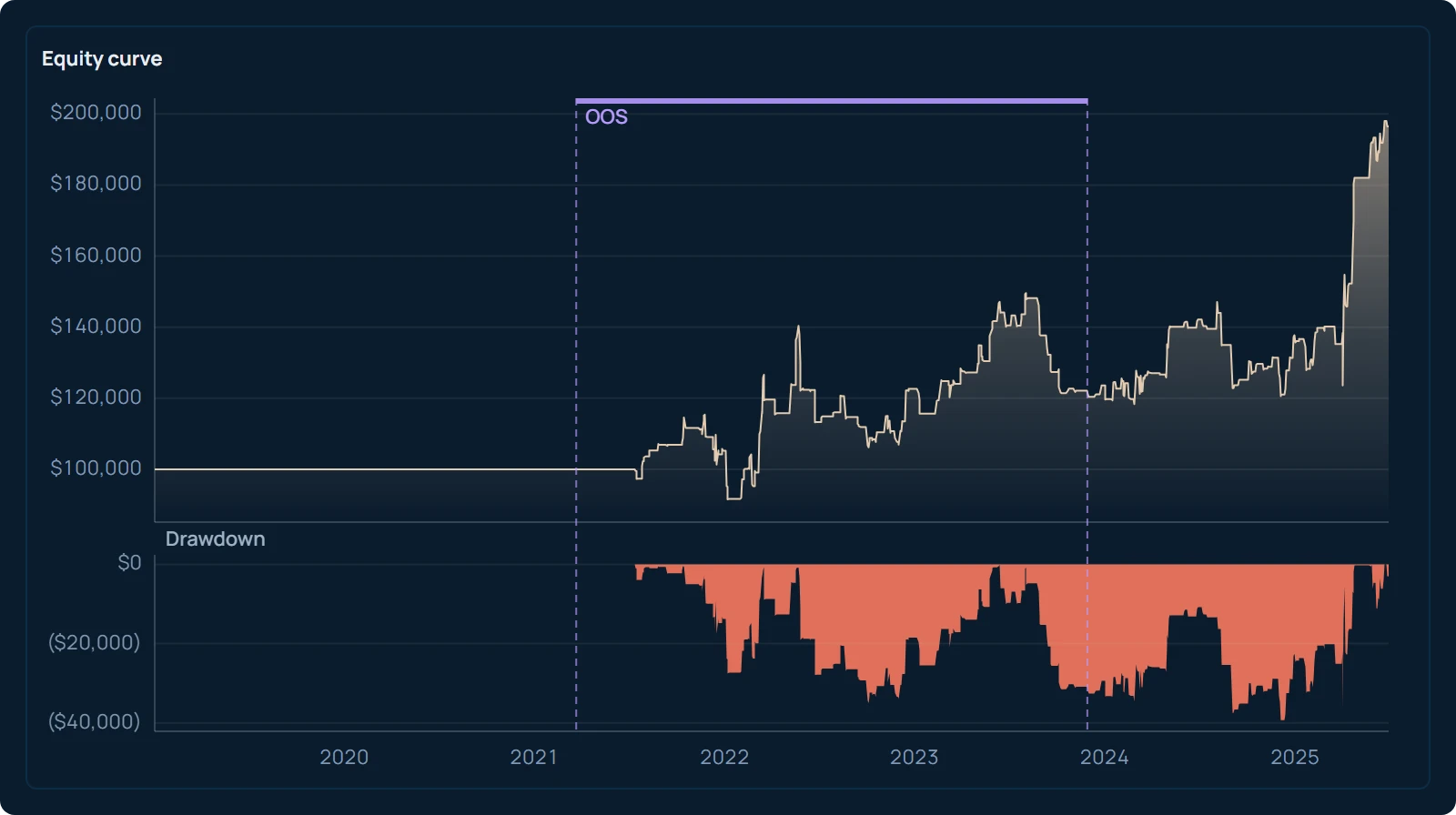
Three things should be made clear when reading this report. First, it is the one kept from 1,024 candidates the search tried, selected by its ratio of return to drawdown; when you look only at the best of many, the numbers will naturally look better. Second, 146 trades over six and a half years, averaging $660.89 each, is the backtest result of this stand-in rule over this period. It does not mean MACD or any rule "earned this money," and it is not a figure a reader should expect. Third, NQ is worth $20 per point and its minimum tick of 0.25 points equals $5 (per the CME contract specification), so the $10 slippage setting amounts to two ticks per side per trade, a reasonably conservative assumption on daily bars. AlphaPrime includes commission, slippage and next-bar fills in every evaluation, so the ranking you see is already net of costs.
Which type of systematic trader suits Touchance?
Touchance suits futures traders who already have a source of strategy signals and need multi-broker accounts with reliable order routing. Those who need to run large-scale strategy search and validation within the same software should place it at the last segment of the workflow, with research and execution tools building the strategy beforehand. The table below describes what each of three types of reader needs to add.
| Reader type | What Touchance covers | Other tools still needed | First thing to confirm |
|---|---|---|---|
| Manual chart-and-order trader | Charting, conditional orders, multiple accounts | Not necessarily any other tool | Whether the broker supports it, and which conditional order types are available |
| Programmatic trader with an existing strategy signal | Receives signals and sends orders, API | An execution platform or self-written program to generate signals | Whether the API module is enabled, and how it connects to the execution platform |
| Researcher who runs large-scale strategy search and validation | Order routing at the end of the workflow | Strategy research tool plus execution platform | The research tool's export format, and whether the target platform can load it |
Whichever type you are, the next step is the same: open the version of Touchance your futures broker provides, and go through the five order types in the third section one by one to check whether each is available and which side monitors it. If you plan to trade by program, also confirm whether the API module is enabled. Once you have finished these two checklists, you will know whether your strategy signals can be fully executed here.
Frequently asked questions
Is Touchance free?
It depends on which futures broker you get it from and which modules you use. Some brokers provide it free to clients; others charge separately for the API or overseas quotes. Confirm the software fee, quote fees, API module fee and historical backfill fee with your broker, then add the commissions and transaction tax you pay on every fill to get the full cost of use.
Which brokers does Touchance support?
It can log into accounts at several domestic futures brokers from one interface, but the list of partners changes, so there is no fixed answer. The most reliable approach is to ask your own broker whether it offers Touchance, and which conditional order types and API modules the version includes.
Can Touchance run strategies?
It handles quotes and order routing, while the strategy has to be built elsewhere. The usual approach is to generate signals with a strategy on an execution platform, or to write your own program that calls its API, and then let Touchance send the orders to the broker. A strategy built in another research tool must first be exported as platform source code, loaded on the platform and checked against the backtest before it reaches the order-entry stage.
Can Touchance be used together with a strategy execution platform?
Yes, and this is a common combination among Taiwan programmatic traders. The execution platform loads the strategy, backtests it and emits signals during the session, and Touchance receives the signals and sends the orders to the broker. The two each cover one segment of the workflow and do not replace each other.
References
- U.S. Securities and Exchange Commission. Stop, Stop-Limit, and Trailing Stop Orders (Investor Bulletin). https://www.investor.gov/introduction-investing/general-resources/news-alerts/alerts-bulletins/investor-bulletins-15
- U.S. Securities and Exchange Commission. Understanding Order Types (Investor Bulletin). https://www.investor.gov/introduction-investing/general-resources/news-alerts/alerts-bulletins/investor-bulletins-14
- Taiwan Futures Exchange. Mini-TAIEX Futures. https://www.taifex.com.tw/enl/eng2/mTX
- CME Group. E-mini Nasdaq-100 Futures Contract Specs. https://www.cmegroup.com/markets/equities/nasdaq/e-mini-nasdaq-100.contractSpecs.html