

After Exporting a Futures Strategy: When a Low-Latency VPS Helps
A VPS keeps your trading platform online and can shorten the path to your broker. Check uptime first, measure latency yourself, and repeat the trade-list comparison on the VPS.
By Soren Huang · Published · updated · Editorial policy
Contents
- What changes after you export a strategy?
- Why does uptime come first?
- How much does distance add?
- When does lower latency matter?
- How do you test a VPS before relying on it?
- How do you choose a VPS?
- TradingVPS, our VPS partner
- How TradingVPS works with AlphaPrime
- Another option: QuantVPS
- Frequently asked questions
- Sources
A low-latency VPS does two things for an exported futures strategy: it keeps your trading platform online when your own computer is off, and it can shorten the network path to your broker. Check the first one first. A strategy that is offline cannot act, however short the path is. This guide covers what changes after export, how much distance really adds, and how to test a VPS before you rely on it.
What changes after you export a strategy?
Research and execution are separate jobs. AlphaPrime (Valynox) generates, backtests and validates strategies, then exports their source code to MultiCharts, TradingView, TradeStation, NinjaTrader, MetaTrader 4 or MetaTrader 5. AlphaPrime does not place orders. Once you import a strategy, it runs in your trading platform, on whichever computer hosts that platform. The platform export page shows what you get for each of these platforms.
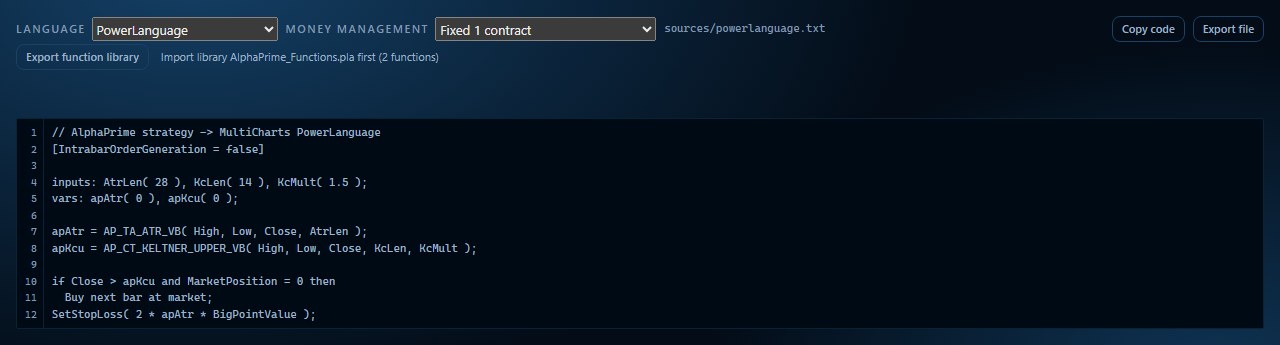
A backtest assumes the strategy was running for the whole test, at the costs you entered. In live use, three things are no longer assumptions: whether the platform is running, how long an order takes to travel, and what fill you receive.
Why does uptime come first?
The session is long. E-mini S&P 500 futures trade from Sunday 5:00 p.m. to Friday 4:00 p.m. Central Time, with a daily maintenance period from 4:00 to 5:00 p.m. CT [1]. That is 23 hours on a normal weekday. Here is what that means for each environment.
- Windows restarts. Automatic restarts after an update occur outside active hours, and later Windows versions allow active hours of up to 18 hours [2]. A 23-hour session does not fit inside that window, so the restart time has to be chosen deliberately. Microsoft also notes that only active Remote Desktop sessions count as signed-in users [2], so check the update settings on a VPS you reach by remote desktop.
- Connection loss in NinjaTrader 8. NinjaTrader 8 offers Keep Running, Recalculate and Stop Strategy as connection-loss settings, and a strategy halts once its allowed restart attempts are used up [3]. A stable connection keeps you away from that limit.
- Connection and power in MetaTrader. MetaQuotes describes Expert Advisor use as requiring a constant connection to the trade server and an uninterrupted power supply [4].
- TradingView alerts. When you create a strategy alert, TradingView makes a copy of the strategy on its servers, which runs independently of the chart in your browser [5]. For this setup, a VPS may add little.
How much does distance add?
Distance sets a lower limit. A signal in optical fibre travels about 200 km per millisecond [6]. The table applies that figure to the straight-line distance from Chicago.
| From Chicago to | Straight-line distance | Lower limit, one way | Lower limit, round trip |
|---|---|---|---|
| New York | about 1140 km | 5.7 ms | 11.4 ms |
| Los Angeles | about 2800 km | 14.0 ms | 28.0 ms |
| London | about 6350 km | 31.8 ms | 63.5 ms |
| Taipei | about 12000 km | 60.0 ms | 119.9 ms |
These are our own calculations, for illustration. They are not measurements of any provider or route. Real cables are longer than a straight line, and network equipment adds time, so your measured figures will be higher.
The figure that matters to you is the time to the server your platform connects to, which is usually your broker's. Measure that route, rather than relying on a figure quoted for an exchange.
When does lower latency matter?
This depends on how the strategy trades. The comparison below is reasoning from how orders work, not a measured result.
| Lower latency tends to matter more | Lower latency tends to matter less |
|---|---|
| Orders generated within the bar on short bars | Orders generated at the close of 30-minute or 60-minute bars |
| Entries around the open or scheduled news, when prices move quickly | Positions held for hours or days |
| A small average trade, where one tick changes the result | An average trade many ticks larger than your slippage assumption |
Put the cost in dollars. One tick on E-mini S&P 500 futures is 0.25 index points, or $12.50 [1]. One extra tick on both entry and exit is $25 per contract, per round turn. Compare that with your strategy's average trade, as explained in trading costs in backtests.
A shorter path does not by itself mean a better fill. Compare your own fills with your backtest's slippage assumption, on your own contract and session.
How do you test a VPS before relying on it?
- Check support. Confirm the provider supports your platform and operating system, and offers a data centre near your broker's server.
- Match the backtest. Install the platform, then set the time zone, session template, instrument and costs to match your research.
- Repeat the trade-list comparison. Run the strategy on the same data on the VPS and compare trades one by one. The export guides for NinjaTrader, MultiCharts and TradeStation show how.
- Measure the route. Record round-trip time to your broker's server from home and from the VPS, at several times of day, including the open.
- Schedule restarts. Place updates and restarts in a period when you hold no position and the market is closed, such as the daily maintenance period for E-mini S&P 500 futures [1]. Then confirm the platform and strategy start correctly afterwards.
- Set the connection-loss behaviour. Choose what the strategy does when the connection drops, then test it on a simulated account.
- Compare fills. Run on a simulated account first, then compare results with your backtest assumptions before you decide on anything further.
How do you choose a VPS?
Check platform support, data-centre location, restart control, remote access and your own measured latency. Treat latency figures in marketing as a starting point, and measure the route you will use.
TradingVPS, our VPS partner
TradingVPS (partner referral link) is the VPS provider on our partners page, and a company we work with directly. Founded in 2024, it provides VPS hosting built for traders [9], running trading platforms around the clock on servers in data centres [7]. When your own computer is off or restarting, the platform and its strategies can keep running, and you manage them by Remote Desktop from a computer, tablet or phone.
We recommend TradingVPS because we share the same view of how research and execution divide. In October 2026 the company published a full guide to researching ES and NQ strategies with AlphaPrime, exporting them to NinjaTrader, testing in simulation and then running them on a VPS, and it states plainly that a VPS cannot promise connectivity, fills or performance [8]. That matches the advice in this guide: confirm uptime first, then measure and compare for yourself.
Everything in this table is as TradingVPS lists it on its website.
| Item | As listed by TradingVPS | Source |
|---|---|---|
| Data centres | Chicago, New York, London, Frankfurt, Amsterdam, Dublin. The company recommends Chicago for futures, close to CME Group. | [7] |
| Hardware | AMD Ryzen 9 9950X processors, DDR5 memory, NVMe SSD storage; a dedicated IPv4 address on every server. | [7] |
| Operating system | Windows Server 2022 or Ubuntu 22.04 | [7] |
| Platforms | Lists NinjaTrader, TradeStation, MetaTrader 4/5, TradingView, Tradovate, Quantower, Bookmap, cTrader and more; its FAQ says the service is broker-independent. | [7] |
| Plans | Six tiers, sized by how many charts you run at once, from 1 simple chart to 8 or more; upgrades through support. | [7] |
| Setup and access | Ready in about 5 minutes; Remote Desktop from a PC, laptop, tablet or phone; several platforms or accounts on one VPS. | [7] |
| Support and trial | 24/7 human technical support by live chat and email; a free 1–3 day trial on request. | [7] |
| Protection | Free DDoS protection; unlimited trading traffic. | [7] |
Based on these details, TradingVPS fits these situations:
- You run NinjaTrader, TradeStation or MetaTrader and want the platform and its strategies running while your computer is off.
- You trade CME futures and want a Chicago data centre close to CME Group.
- You run several platforms, accounts or charts and need a plan sized to match.
- You want to test before you commit: request a 1–3 day trial and measure the route from the VPS to your broker, following the steps in How do you test a VPS before relying on it?
If you use MultiCharts, TradingVPS has no MultiCharts page, so please confirm your setup with TradingVPS before ordering.
How TradingVPS works with AlphaPrime
TradingVPS's own article describes the same division of work: AlphaPrime handles research and does not execute live orders, and a Windows VPS can give the trading platform a persistent environment [8]. In practice:
- Generate, backtest and validate strategies with AlphaPrime on your computer, then export the source code.
- Connect to TradingVPS by Remote Desktop and install your trading platform. For NinjaTrader and MultiCharts, import the AlphaPrime library first.
- Import the strategy on the VPS and compare its trade list with your research on the same data.
- Run it on a simulation account first, check restarts, disconnection handling and fills, then decide on your next step.
The TradingVPS article also walks through researching ES and NQ strategies with AlphaPrime [8].
Another option: QuantVPS
QuantVPS is a trading VPS provider based in Chicago. Its Chicago data centre is aimed at CME futures, and the platforms it lists include MultiCharts, NinjaTrader, TradeStation and MetaTrader 4/5. It offers Windows Server and Linux hosting, with 24/7 ticket support [10]. If you use MultiCharts, it is worth including in your comparison.
If you go through the QuantVPS referral link, the referral code ALPHAPRIME is applied at checkout and the first month is discounted; the exact discount is as shown on the QuantVPS checkout page. AlphaPrime may receive a referral commission. Before choosing, measure and compare following the steps in How do you test a VPS before relying on it?
Frequently asked questions
Does a VPS improve a strategy's results?
A VPS changes where the platform runs. It does not change the strategy's logic or its research results. Validate the strategy first, with walk-forward analysis and held-out data, and then decide where to run it.
Does AlphaPrime send orders to the VPS?
No. AlphaPrime does not place orders. It exports source code, and you import that code into your trading platform.
Do I need a VPS for TradingView?
Often not for strategy alerts, because TradingView runs a copy of the strategy on its servers [5]. Check how your own setup sends orders.
Sources
Sources [1]–[6] and [8] read on 2026-10-31; [7], [9] and [10] read on 2026-11-02. Provider details are as listed on their websites and can change.
- CME Group, E-mini S&P 500 futures contract specs (trading hours, maintenance period, tick size)
- Microsoft Learn, Enforce compliance deadlines and restarts for Windows updates (active hours, Remote Desktop sessions)
- NinjaTrader 8 Help Guide, Strategies options (connection-loss settings)
- MetaTrader 5 Help, Virtual hosting (connection and power requirements)
- TradingView Help Center, strategy alerts (copy of the strategy on TradingView's servers)
- Wikipedia, Optical fiber (signal speed in fibre; a general figure)
- TradingVPS website (data centres, hardware, operating system, platforms, plans, setup and access, support and trial, protection, as stated by the provider)
- TradingVPS, ES and NQ Algorithmic Trading: Generate, Backtest and Validate Strategies With AlphaPrime (October 23, 2026)
- TradingVPS, About (founding year and who it serves, as stated by the provider)
- QuantVPS website (location, Chicago data centre, platforms, operating systems, support, as stated by the provider)