

MT5 Strategy Tester: modes, settings and how far to trust the report
The MT5 Strategy Tester replays an Expert Advisor over the broker's downloaded history, and its report is as trustworthy as the tick mode, the history quality, the spread and cost settings, and whether the run was picked out of an optimization after the fact. Read a single run at face value; read the best cell of an optimization on its forward period and its neighbours.
By Soren Huang · Published · updated · Editorial policy
Contents
- How does the MT5 Strategy Tester work, and how far can you trust it?
- What is the difference between Every tick and Real ticks in MT5?
- How do you set up a test in the MT5 Strategy Tester?
- Why is history quality low in the MT5 tester, and how do you fix it?
- Why does the MT5 Strategy Tester open no trades or refuse to start?
- Optimization or single run: how do you read the MT5 or MT4 report?
- How does the MT5 Strategy Tester handle futures data?
- Frequently asked questions
- References
How does the MT5 Strategy Tester work, and how far can you trust it?
The MT5 Strategy Tester replays an Expert Advisor over your broker's downloaded price history, bar by bar or tick by tick. Its report is as trustworthy as four things you control: the tick modelling mode, the quality of the history, the spread and cost settings, and whether the run you are reading was picked out of an optimization after the fact.
The Strategy Tester is the window inside MetaTrader 5 that runs a trading program against past prices and writes down every order it would have sent. An Expert Advisor (EA) is that trading program: a set of rules written in MQL5 that decides when to buy, sell and close. Put together, the tester is a replay pipeline, and the idea behind it is the same as any backtest of a futures rule on old prices: feed in history, apply the rules, record the fills, sum the result.
Think of the pipeline as a water line with four joints. History arrives from the broker's server. The modelling mode decides how fine the price stream is. The EA decides and is filled with the spread and delay you set. The Journal and the report collect what happened. Trust can leak at each joint, and the leak that costs traders the most is the last one: reading the single best run out of a thousand-run optimization as if it were the only test you ran. Everything below comes back to that one leak.
What is the difference between Every tick and Real ticks in MT5?
Every tick builds artificial ticks inside each 1-minute bar from its open, high, low and close, while Real ticks replays the ticks the broker actually recorded where they exist, so Real ticks is closer to what happened but covers a shorter period and runs slower. Tick modelling is the rule the tester uses to turn stored bars into the stream of prices the EA sees between bar closes.
The full name of the second mode in the settings panel is "Every tick based on real ticks". Where the broker has no recorded ticks for part of the date range, the tester falls back to generated ticks for that part, which is why the history quality figure in the next sections matters. The two faster modes, 1 minute OHLC and Open prices only, give the EA four prices per minute or one price per chart bar. They suit rules that decide once per bar and never place a stop or pending order that could be hit inside the bar.
| Mode | Where prices come from | Prices per 1-minute bar | Speed | Rules it suits |
|---|---|---|---|---|
| Real ticks | Broker's recorded ticks | All recorded | Slowest | Intrabar stops and pending orders |
| Every tick | Ticks generated from each M1 bar | Several generated | Slow | Most rules |
| 1 minute OHLC | Four prices per minute | 4 | Fast | Bar-close rules |
| Open prices only | One price per chart bar | 1 per chart bar | Fastest | Bar-open rules only |
A practical way to choose: run the EA once in Open prices only to catch logic errors in minutes, then run it in Every tick or Real ticks for the result you keep. If the two slow modes disagree by a lot, the EA depends on where inside the bar a stop was touched, and that is useful to know before you trade it.
How do you set up a test in the MT5 Strategy Tester?
A test is set up in a fixed order, history first, so that every later field refers to data that actually exists. Open the tester from the View menu (Strategy Tester) and fill the Settings tab from top to bottom:
- Download the symbol's history. Open a chart of the symbol and scroll back, or let the tester download when it starts. Confirm in the Journal tab that the download finished.
- Pick the Expert Advisor. A compiled EA appears in the list; one with compile errors does not.
- Pick the symbol and timeframe. The timeframe is the chart period the EA reads, not the modelling step.
- Set the date range inside the period that has data. A start date before the first downloaded bar lowers history quality from the first day.
- Choose the modelling mode from the table above.
- Set deposit, leverage and spread. Use the account currency you trade, the leverage your broker gives you, and a fixed spread in points at least as wide as a normal live quote.
- Add execution delay and a forward period. A fixed or random delay stands in for the time an order takes to reach the server. The forward setting holds back the last part of the range as a check the optimizer does not see.
- Press Start with the Journal tab open. Errors appear there as they happen, not after the run.
Two settings deserve a second look before you press Start. The tester charges the commission your broker's symbol specification defines; if that specification lists none, the report shows none, and the EA has to carry the cost itself. And a spread left at a narrow value makes a scalping rule look far cheaper to run than it is. Both are the "zero spread" leak in the first figure.
Why is history quality low in the MT5 tester, and how do you fix it?
History quality drops when the date range includes periods that have no data, periods covered only by generated ticks, or a start date before the broker's tick history begins; the fix is to download the full history, move the start date forward, or test on a server that keeps longer tick data. History quality is the share of the test period that the tester could replay from real ticks or complete 1-minute bars, shown as a percentage in the report.
Read the figure as a map rather than a grade. A low number does not mean the EA is wrong; it means part of the report describes prices the tester invented. Most brokers keep recorded ticks for a shorter period than they keep 1-minute bars, so a long date range in Real ticks mode is often part real, part generated, and the quality figure tells you the mix.
Hypothetical example
Suppose a broker's symbol has no data before mid-2020, 1-minute bars from mid-2020 to the end of 2021, and recorded ticks from 2022 onward. A Real ticks test set from January 2019 to June 2025 replays about a year and a half of nothing, a year and a half of generated ticks, and three and a half years of real ticks, and the quality figure reflects that mix. Moving the start date to January 2022 makes the whole run real ticks and lifts the quality reading, at the price of a shorter test.
When you need the longer range more than you need real ticks, keep the early start and run in Every tick mode, then write in your notes that the early years are modelled. A result that holds up on both the modelled years and the real-tick years is stronger evidence than either alone.
Why does the MT5 Strategy Tester open no trades or refuse to start?
A tester that does not start usually has no history, a compile error or no free testing agent, while a tester that runs but opens no trades usually has a lot size below the symbol's minimum, too little deposit for the margin, an input value that never triggers the rule, or a symbol whose contract specification does not match the EA. The Journal tab and the Experts tab name the cause in every case, so read them before changing anything.
| What you see | Does not start | Runs, zero trades |
|---|---|---|
| Journal line | No history for the period, compile error, no agent available | "Invalid volume", "Not enough money", or no order lines at all |
| Cause | Data not downloaded, EA not compiled, local agent disabled | Lot below the symbol minimum or step, deposit below margin, rule never true, wrong symbol specification |
| Fix | Download history or move the dates; fix the EA; enable the local agent in the Agents tab | Raise the lot to the minimum; raise the deposit; check the inputs; open the symbol specification and compare contract size and digits with what the EA expects |
The "rule never triggers" case is the one that hides best, because nothing is reported as an error. A moving-average length set in bars that is longer than the test period, a price threshold typed in the wrong number of digits, or a session filter that is never true in the broker's server time will all produce a clean run with zero trades. Run the EA once in visual mode on a short range and watch whether the entry condition ever becomes true on the chart.
Optimization or single run: how do you read the MT5 or MT4 report?
A single run produces one report whose net profit, profit factor, trade count, maximum drawdown and history quality you can read at face value, while an optimization produces hundreds or thousands of runs, and the best cell in that grid is flattered by selection, so it must be judged on the forward period and on the neighbouring settings rather than on its own numbers. An optimization is a batch of single runs, one for each combination of input values you allowed, sorted by a criterion you chose.
Below is the kind of report a single kept candidate produces, from our own run rather than from the MT5 tester. AlphaPrime (Valynox) tested a stand-in rule built from a standard indicator, a VWAP rule as the only entry and exit with no stop, target or filter, on ES daily bars from 2019-01-02 to 2025-06-30, long and short, one contract, with $20 commission and $25 slippage charged on every trade. The search tried 1,024 settings and kept this one for its return against its drawdown. The rule is a stand-in: it is not the subject of this article, and the numbers describe that one replay, not a forecast.
Source: AlphaPrime product engine (CPU), run 2026-10-31. ES daily bars, 2019-01-02 to 2025-06-30, long and short, 1 contract, $20 commission and $25 slippage per trade.
| Number | Result |
|---|---|
| Net profit (closed trades) | $109,660 |
| Max drawdown | $56,977.5 |
| Trades | 67 |
| Win rate | 65.67% |
| Profit factor | 1.769 |
| Average trade | $1,636.72 |
| Time in market | 91.62% |
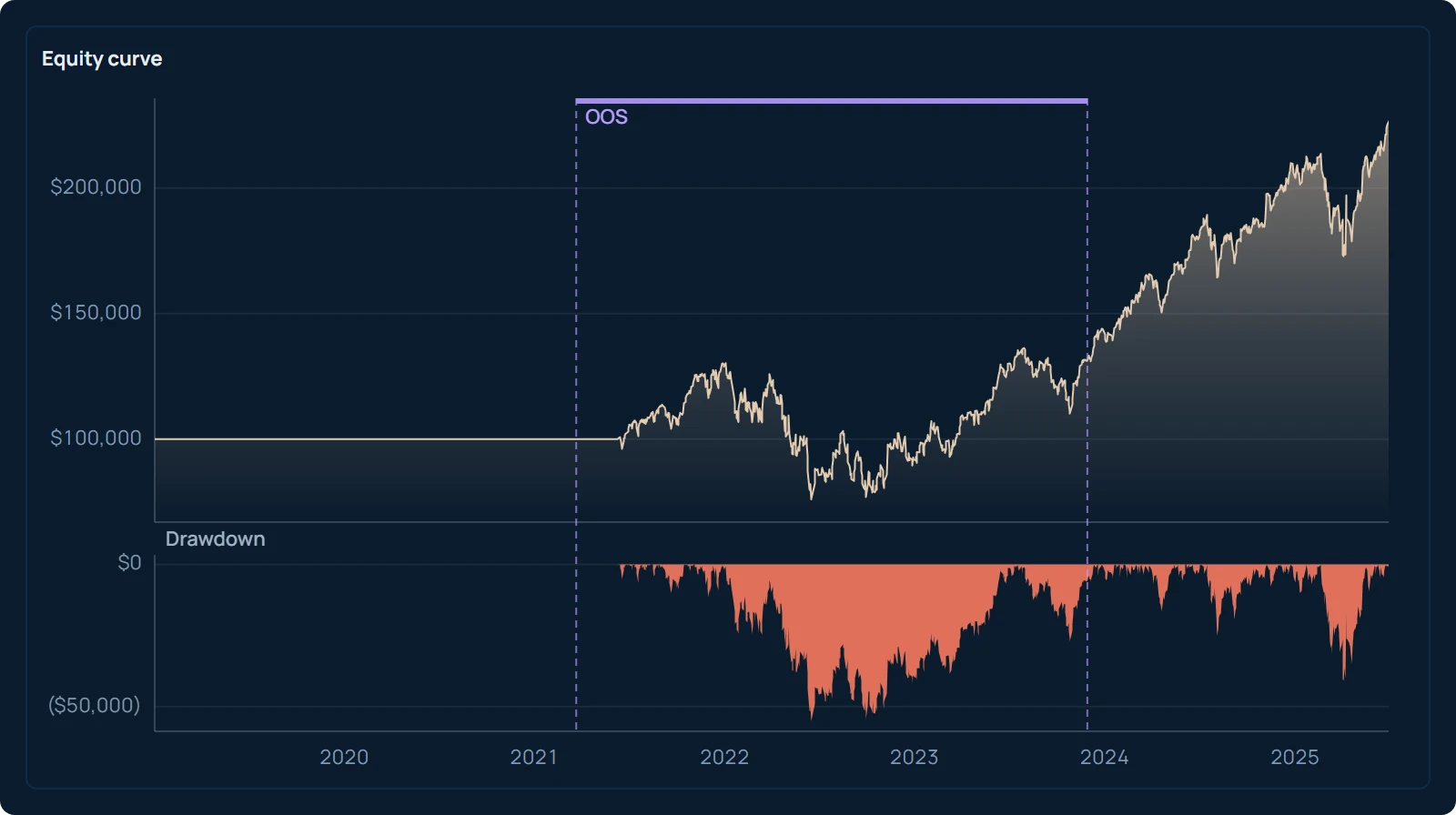
Read as a single run, the table says what happened: 67 trades, a profit factor of 1.769, a drawdown of $56,977.5 against a net profit of $109,660. Read as what it is, the best of 1,024 tries, every one of those numbers is higher than a fair estimate, because picking the winner after the fact selects for luck as well as for any real pattern. Bailey, Borwein, López de Prado and Zhu (2014) show that the more combinations a search tries, the larger this selection bonus becomes, and their later paper (2017) turns it into a probability that the chosen run is overfit. Sixty-seven trades over six and a half years is also a small sample, so a few trades decide the average, and the equity curve simulator guide to what one backtest curve hides shows how much the drawdown can move when the same trades arrive in a different order.
The MT5 optimizer puts the same trap in front of you in the Optimization results tab, and the MT4 Strategy Tester does the same with its three modes and its report of Modelling quality, Total net profit, Profit factor, Expected payoff, Maximal drawdown and Total trades. The way out is a reading rule written before the run:
- Set a forward period (1/4 or 1/3 of the range) so each run also reports a result on data the optimizer never saw. Judge the kept cell on the Forward results tab, not the main tab.
- Look at the eight neighbouring cells. If the kept setting is good and its neighbours are poor, the result is a spike in noise. Pardo (2008) describes this parameter-neighbourhood check in detail.
- Count the trades. A cell with few trades can win the grid on two lucky positions.
- Rerun the kept cell as a single run in the slowest modelling mode, with the spread and delay you set in step six and seven of the setup, and read that report, not the grid cell.
AlphaPrime's strategy validation with thresholds you set in advance holds every candidate a search keeps to thresholds you wrote before the run, walk-forward analysis included, so the candidate you look at has already passed a test that was written before its numbers existed.
How does the MT5 Strategy Tester handle futures data?
For futures the tester works on one broker symbol at a time with the contract size, margin and sessions that broker defined, so each expiring contract carries only a short history, no continuous series is stitched for you, and rollover gaps and session breaks are your job. A continuous series is one price history built by joining each expiring contract to the next at a chosen roll date, and it is what a backtest over many years needs.
Many brokers list each expiring contract as its own symbol: a March contract, a June contract and so on, each with a few months of prices before it stops trading. Run the EA on one of them and the test ends when that contract expires. Run it on the next and the price level has jumped, because the two contracts never traded at the same price. The same one-symbol design is one reason options backtesting is harder than futures: each strike and expiry is its own short history. The full list of what a long futures test needs, from roll dates to tick values, is in futures backtesting done right: specs, rollover and costs.
Three things follow for a futures trader using the tester:
- Check the symbol specification first. Contract size, tick size, margin and trading sessions are whatever the broker entered, and they decide the profit per point and the margin the "Not enough money" check uses. Exchanges can change contract values; compare the specification with the exchange's contract page.
- Build or import a continuous series yourself. MT5 can hold a custom symbol built from bars you import, which is the route for a stitched multi-year series, and the same route serves anyone who wants to backtest Taiwan stocks and ETFs with their own data.
- Treat session breaks and roll days as part of the rule. A stop that would have been hit at the reopen after a gap is not the same as a stop hit during trading hours, and the EA has to know which one it got.
A futures-specific backtest on your own bar data, with the continuous series, the session times and the commission and slippage set once for the whole history, is the way to test a rule over many years and many contracts. The rule can still end up in the terminal afterwards: AlphaPrime exports strategy source code to MetaTrader 5 (MQL5) and MetaTrader 4 (MQL4), among the platforms on the platform export page, so the version you run live is the version you tested.
Your next step: open the symbol specification of the futures contract you trade in MT5, write down its contract size, tick size and margin, and compare them with the exchange's contract page. Then run your EA once in Open prices only over the last three months with the Journal open, and read what the Journal says before you read the report.
Frequently asked questions
Is the MT4 Strategy Tester the same as the MT5 Strategy Tester?
They do the same job with fewer options in MT4. The MT4 tester offers three modelling methods (Every tick, Control points, Open prices only), tests one symbol per run and has no real-tick mode or forward period. The reading rules are the same: a single run can be read as is, and an optimization's best pass has to be checked on data it did not see and on neighbouring settings.
How do I interpret an MT4 backtesting report?
Start with Modelling quality, which tells you how much of the test used complete 1-minute data. Then read Total trades, Profit factor, Expected payoff (the average result per trade) and Maximal drawdown together, because a high net profit from a handful of trades or with a drawdown near the deposit is not a usable result. Compare Expected payoff with the spread and commission you pay live; if the payoff is only a little larger than the round-trip cost, small changes in execution remove it.
What does "Not enough money" mean in the MT5 tester Journal?
The deposit set in the Settings tab is smaller than the margin the symbol specification requires for the lot size the EA sent. Raise the deposit, lower the lot, or check that the leverage field matches your account. If the message appears only on some orders, the EA is scaling in while earlier positions already use most of the margin.
Can I backtest futures in the MT5 Strategy Tester?
Yes, on the futures symbols your broker lists, each with the contract size, margin and sessions that broker defined. Because most brokers list each expiring contract separately, one symbol holds only a few months of history, so a multi-year test needs a continuous series that you build or import as a custom symbol. Roll gaps and session breaks are then part of your rule, not something the tester handles for you.
What is the forward period in MT5 optimization?
The forward period is the last part of the date range that the optimizer does not use when ranking settings. Each setting is first optimized on the earlier part, then run unchanged on the forward part, and the two results appear in separate tabs. A setting that ranks well in the main results and poorly in the forward results was fitted to the earlier data.
References
- Bailey, D. H., Borwein, J., López de Prado, M., & Zhu, Q. J. (2014). Pseudo-Mathematics and Financial Charlatanism: The Effects of Backtest Overfitting on Out-of-Sample Performance. Notices of the American Mathematical Society, 61(5), 458–471.
- Bailey, D. H., Borwein, J., López de Prado, M., & Zhu, Q. J. (2017). The Probability of Backtest Overfitting. Journal of Computational Finance, 20(4), 39–69.
- Pardo, R. (2008). The Evaluation and Optimization of Trading Strategies (2nd ed.). John Wiley & Sons.