

Night sessions in futures backtests: day-only vs. full-session bars
Major news often lands after the day session closes, so the first reaction happens in the night or overnight session. Bars built from the day session alone and bars that include the night session produce different indicators and signals. Here is how the two differ and how to keep your backtest session in line with how you trade.
AlphaPrime team ·
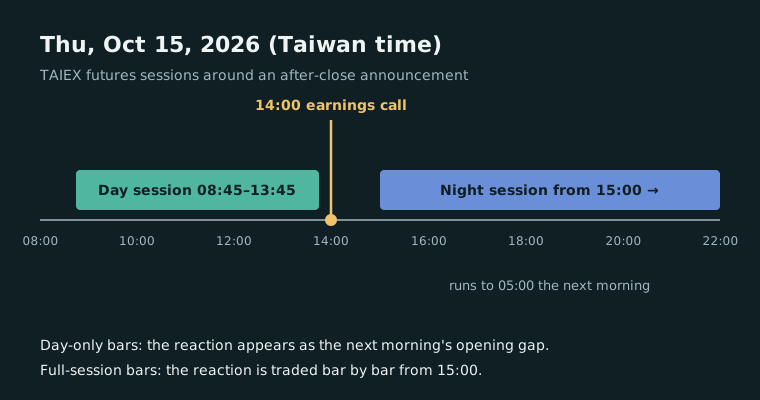
News after the close, reaction in the night session
TSMC has announced that its third-quarter 2026 earnings conference will be held on Thursday, October 15, 2026, at 14:00 Taiwan time. Under the contract specifications of the Taiwan Futures Exchange (TAIFEX), TAIEX futures trade a regular session from 8:45 a.m. to 1:45 p.m. and an after-hours session from 3:00 p.m. to 5:00 a.m. the next morning (Taiwan time) on each business day.
The day session has already closed when the conference starts, so the first chance to react through TAIEX futures is the night session from 3:00 p.m. News released after the close is common. U.S. equity index futures trade almost around the clock: CME lists E-mini S&P 500 futures on CME Globex from Sunday 6:00 p.m. to Friday 5:00 p.m. ET, with a daily maintenance period from 5:00 p.m. to 6:00 p.m. ET. Whether your backtest includes the night or overnight hours decides which market your strategy actually sees.
One market, two kinds of bars
The same futures market can be turned into bars in two ways:
- Day session only: each trading day uses only the regular-session trades. Whatever happens overnight never appears in a bar; it shows up as a gap at the next day-session open.
- Full session (day plus night): night-session trades form bars too. Daily highs and lows include night-session prices, and there are many more bars per day.
Neither is wrong, but they measure different things. The same strategy on the other kind of bars can enter and exit in different places and trade a different number of times.
How indicators and signals change
- Moving averages and other bar-count indicators: on intraday bars, the same number of bars covers less clock time on full-session data, and it mixes in night-session prices.
- Volatility indicators: on intraday day-only bars, the overnight move lands in the opening bar, so its true range (which counts the gap) spikes and a short ATR jumps with it. Full-session bars spread the same move across the night bars.
- What "a day" means: opening ranges, daily highs and lows, and exit-at-end-of-day rules all depend on when a trading day starts and ends. Day-only and full-session data give different answers.
- Stop fills: on day-only bars, a large night-session move arrives all at once at the next open. A backtest that fills stops exactly at the stop price will look better than reality.
Match the backtest to how you trade
The main rule: the session in your backtest should be the session you will actually trade.
- A strategy that trades only the day session and is flat by the close: backtest on day-session bars and exit at the end of the session.
- A strategy that trades day and night: backtest on full-session bars, and estimate night-session costs and slippage separately.
- Avoid mixing the two, such as computing signals on full-session data but placing orders only in the day session, without reflecting that difference in the backtest.
Expiry days need care too. TAIFEX specifies that the expiring contract has no after-hours session on its last trading day, and that its day session that day closes at 1:30 p.m., so the data around a roll does not follow the usual pattern.
When you take a strategy to a trading platform, its session settings must match the ones you researched with, or the bars will differ. How to compare the two is covered in From generated strategy to MultiCharts: a PowerLanguage comparison checklist. Other groundwork for Taiwan index futures is in Backtesting TAIEX futures: five settings to check first.
What AlphaPrime does here
In AlphaPrime, the "Session" setting at the bottom of Generation settings › Market & backtest defaults to "No Session". Click "Add session" to create a custom session, set its interval to the day-session hours, mark "Session end means end of day", then select it under "Session": strategies then only enter during the day session, and the trading day ends at the day-session close. Session times follow the exchange clock of the data. Turn on "Exit at end of day" in the Trading options section of the Strategy rules page, and positions are closed at the end of the day session. The bars themselves follow the imported history. Run the same settings once with "No Session" and once with the day-session custom session, then compare the two trade by trade in the performance report.