

Market holidays in backtests: gaps, reopenings and calendar changes
A holiday leaves no bars in the data, and the first bar after it often opens with a gap. When an exchange changes its holiday schedule, the history splits into two different trading calendars. Here is what to settle before you trust a backtest across holidays.
AlphaPrime team ·
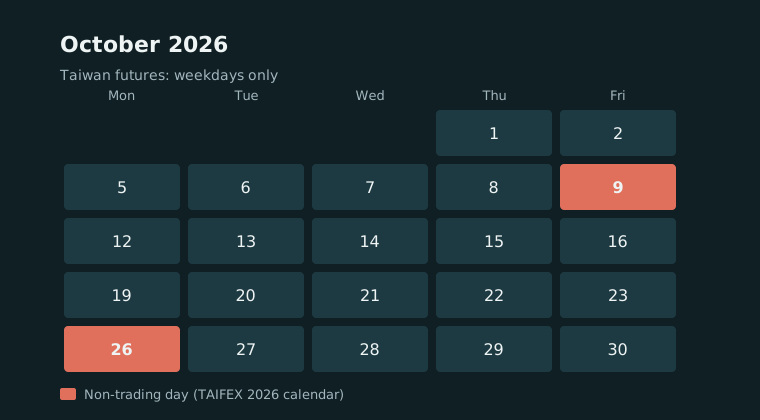
Holidays differ from market to market
Exchanges close on their own national holidays, and those days often do not line up across markets. In Taiwan, for example, the 2026 trading calendar published by the Taiwan Futures Exchange (TAIFEX) lists October 9 (a Friday, the National Day holiday moved from Saturday) and October 26 (a Monday, Taiwan Retrocession Day moved from Sunday) as non-trading days. Markets elsewhere do not necessarily close with it, so whatever happens during the closure reaches the local contract all at once when trading resumes.
For anyone researching systematic strategies, a holiday is more than a missing day of prices. It changes what your data looks like and which assumptions in your backtest still hold.
Holiday schedules can change
Holiday calendars are not fixed forever. According to a TechNews report of January 23, 2026, TAIFEX said it was studying trading on national holidays, limited to national holidays rather than weekends, and that it still needed to reach agreement with futures brokers. The report gave no start date.
The practical issue for research is not the date a change takes effect. It is that, once it does, your history is split: before the change those days had no trading, after it they do. The same strategy run across both periods faces two different trading calendars.
What a holiday looks like inside a backtest
- A gap in the data. There are no bars on a closed day. Any indicator defined by a number of bars covers more calendar time when its window spans a long weekend or a holiday, so a moving average before and after a closure is not measuring the same stretch of time.
- A gap at the reopening. News and moves from other markets during the closure land in the first bar back. If your backtest assumes stop orders fill at the stop price, results across holidays will look better than reality, because fills on a gap are usually worse.
- A different kind of overnight risk. For strategies that hold positions overnight, a multi-day closure stretches the holding period. Those trades have a different return profile from an ordinary overnight hold.
If the calendar itself changes
- Two calendars in one history. Daily-bar indicators and rules such as "the nth trading day of the month" behave differently before and after the change. Compare performance period by period instead of as one block.
- Holiday sessions may trade differently. Participation, volume and spreads on these days can differ from a normal session. Estimate slippage and costs for them separately rather than reusing everyday assumptions.
- Cross-market strategies need date alignment. A strategy that reads both a local index future and an overseas one has to decide what to do with one market's bars on a day when the other is closed.
Three things to do first
- Know why each gap is there. A gap can be a holiday or missing data. Check before deciding whether anything needs filling.
- Analyse trades that span long closures separately. Compare their average result and worst loss with the rest. If the difference is large, consider flattening before long closures.
- Stress-test the first bar after a closure. Increase slippage on that bar and run again. If the strategy no longer holds up, it is highly sensitive to reopening gaps. For setting costs in general, see Trading costs in backtests: commission, slippage and the average trade.
Other groundwork for Taiwan index futures, such as day and night sessions, contract rolls and costs, is covered in Backtesting TAIEX futures: five settings to check first.
What AlphaPrime does here
In AlphaPrime's Market data database, tick the data and press "Verify" to check for gaps, duplicate bars and bad timestamps or prices. Each gap is listed with its start and end in the detail pane, so you can check it against the exchange calendar to tell a holiday from missing data. Under Generation settings › Trading options, run once with "Exit at end of day" on and once with it off, then compare the two results to see what overnight and holiday exposure contributes. Every trade is listed in the performance report.