

VALYNOXSTRATEGY RESEARCH TECHNOLOGY
AlphaPrimeAlphaPrime
APi GUIDE

Ask AlphaPrime.
In plain words.

APi is the assistant built into AlphaPrime. Type a sentence the way you would say it, and APi shows you where a setting lives, keeps an eye on your run, or gets the next step ready for you to confirm.

What APi does for you

Explains any setting

Ask what a field means and how to fill it. APi answers and takes you straight to it.

Walks you through a strategy

Data, rules, generation, results: APi takes you through each step in order.

Looks after a run

Ask how it is going, pause, resume or stop, and see the top strategies so far.

Checks your settings

Before you start, ask APi to check your settings. It lists what to look at and takes you there.

Validates and exports

Select a strategy in the library, then ask for a validation, a walk-forward or an export.
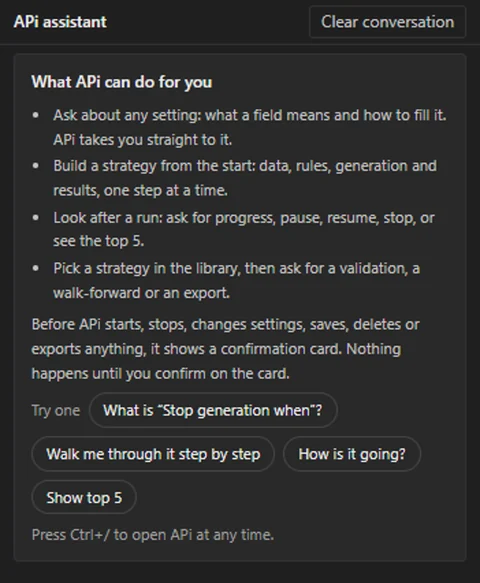
The APi panel the first time you open it.

Sentences to try

  • What is “Stop generation when”?
  • Walk me through it step by step
  • How is it going?
  • Show top 5

Nothing changes until you confirm

Before APi starts or stops a run, changes settings, saves, deletes or exports, it shows a confirmation card that lists what will happen. Nothing runs until you confirm on the card. Pause and resume take effect right away.

Get started in three steps

  1. 1

    Open APi

    Click APi at the bottom of the left sidebar, or press Ctrl+/ anywhere in AlphaPrime.

  2. 2

    Type a sentence

    Write it the way you would say it, or click one of the sentences APi offers. Enter sends; Shift+Enter starts a new line.

  3. 3

    Follow the answer

    APi takes you to the right place on screen. When something needs your OK, a confirmation card appears.

Common questions

I do not see APi.

Open Settings (the gear at the bottom of the left sidebar) ▸ General and turn on “Show the APi assistant”.

APi did not understand me.

Ask for one thing per sentence and use the setting’s name as it appears on screen. Quick phrases, next to Send, lists sentences APi always understands.

Which languages does APi understand?

The language AlphaPrime is set to. All 12 interface languages work.

Where do my sentences go?

You choose in Settings ▸ General, under “What APi uses to answer”. Pick “Don’t send my sentences” to keep everything on this computer. Pause, resume, stop, progress and results are always handled on this computer.

How do I start over?

Select Clear conversation at the top of the panel.

Can I use APi from my phone?

Yes. Connect Claude on your phone to AlphaPrime on your computer; the guide below shows how.